Tabla de contenido
in a world where About 46% of all Google searches have local intention, not having online visibility is like keeping your business door closed. set up google my business (Now known as Google Business Profile) is the first and most crucial step to open that digital door wide. This complete guide will take you by the hand, from basic creation to advanced optimization strategies, so that your local business not only appears, but also stands out in Google Maps and in search results.
Introduction
Have you ever searched for ‘Plumber near me’ or ‘Best cafe in[tu ciudad]’And have you seen those listings with photo, schedules and reviews? Those are Google’s business profiles. It is a free google tool that allows any business with a physical presence or that serves customers in a specific area, manage their information publicly in Google Search and Maps.
Form Google My Business correctly It is not an option; It is the basis of local SEO. An optimized profile acts as a 24-hour landing page, builds trust and is the main factor to appear in the coveted ‘local pack’ (the three listings that appear at the top of local searches).
What is Google My Business and what is it for?
Google My BusinesS (GMB) or Google Business Profile (GBP) It is the control panel from which you manage how your business appears in Google services. Think of it as your interactive digital business card.
Its benefits are concrete:
- Visibility at the time of the decision: You show up when potential customers look for what you offer in their area.
- Trust and credibility: A full profile with photos, schedules and positive reviews reduces customer uncertainty.
- direct interaction: Customers can call you, ask for directions, visit your website or leave a review with a single click.
- valuable information: The ‘Insights’ section shows you how many times you’ve found yourself, how, and with what keywords.
Why is it important to set up Google My Business correctly?
A poorly configured profile can make you invisible or, worse, generate distrust. A precise setup impacts directly on:
- The local positioning: Google prioritizes profiles with complete, accurate and up-to-date information. factors such as Relevance, distance and popularity They are key in your algorithm.
- THE CONVERSION: A user who sees updated schedules, attractive photos, and responses to recent reviews are much more likely to become a customer.
- Reputation management: It is your official channel to respond to opinions and demonstrate your commitment to customer service.
Requirements before setting up Google My Business
Before you start, make sure you have:
- A Google account: It can be a personal Gmail address or, ideally, a corporate account ([email protected]) linked to Google.
- Basic Business Information (NAP): Official and consistent name, address and telephone number.
- A valid physical address (for local businesses) or a defined service area (for itinerant businesses).
- Website (highly recommended): Although not required, driving traffic to your site multiplies conversion opportunities.
How to create an account in Google My Business step by step
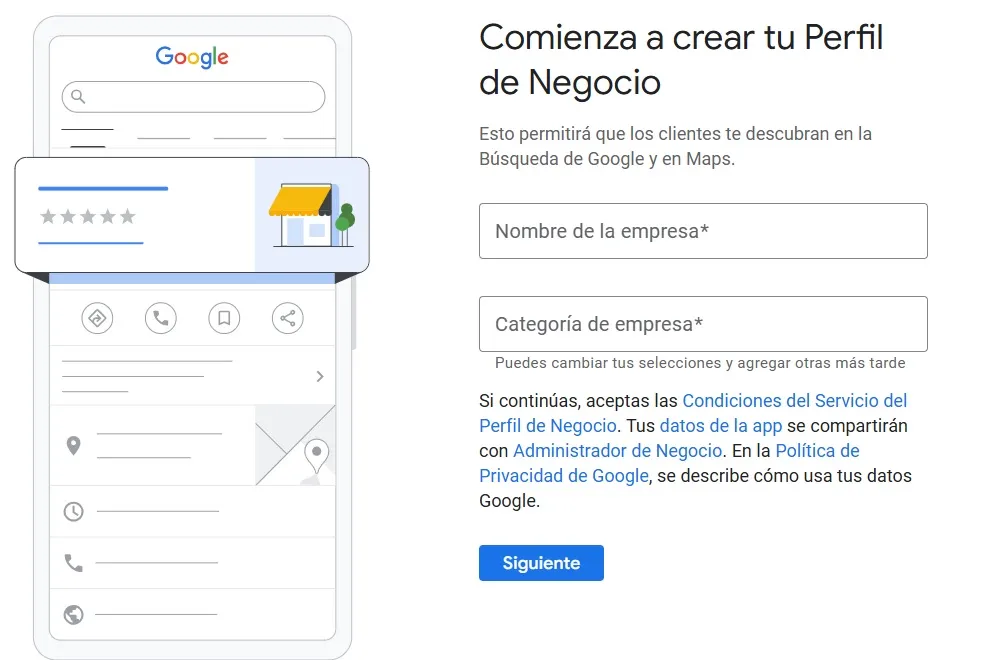
Access Google My Business
Go to https://www.google.com/business/ and click ‘Manage Now’. Sign in with the Google account you want to associate with the business.
Add business name
Enter the Exact and official name of your business, as it appears on your facade, invoices or advertising material. Don’t add extra keywords (eg ‘My Restaurant – The Best Tacos’), as it would violate Google’s policies.
Choose the correct category
This is one of the most important decisions. The main category Define before Google what you do. Choose the most specific possible (eg ‘pizza’ instead of ‘restaurant’). You can then add child categories to detail your services.
Enter the location or service area
- If you have a local: Enter the full address. Customers will be able to ask for directions.
- If you are a home service or do not have attention to the public: Check the option ‘Service area’ and define the zones (by postal codes or cities) you serve.
How to configure Google My Business correctly
Business name (NAP)
Keep the absolute consistency In your name, address and telephone number throughout the web. This uniformity (‘NAP’) is a fundamental trust signal for local SEO.
Main Category and Secondary Categories
Review and adjust categories periodically. Google recommends Choose as few categories as possible describing your core activity.
Physical address and service area
Make sure the marker on the map is accurate. For service business, update your service area if you expand it.
Phone and website
Add the number to which you want to receive calls from clients. In the website, use a link that leads to the most relevant page (the specific homepage or a landing page).
Business hours
Be meticulous. Indicates special schedules for holidays, and updates any temporary changes (such as vacation closing) sufficiently in advance.
Business attributes
They are the ‘tags’ that highlight your features: ‘Free Wi-Fi’, ‘Wheelchair accessible’, ‘Home delivery’, ‘Card payment’, etc. Complete all that apply, as users can filter searches for them.
How to verify your business in Google My Business
Without verification, your profile will not be visible in searches. It is the process to show Google that you are the rightful owner.
Verification methods available
- Postal mail (card): the most common. Google sends a postcard with a code to the physical address. It can take up to 5-14 business days.
- Phone or email: For some businesses, Google offers instant verification through a call or an email with a code.
- Video Verification: may be required in certain cases. You must record a short video showing the exterior, interior and business tools.
Common verification problems
- Wrong address: A typo will make the card not arrive.
- Use of post offices: Google often does not send cards to Po Boxes.
- ineligible business: Some types of businesses (such as purely online without dealing with clients) may not be suitable.
- Lost or expired code: If you lose the card or expire code, you can request a new verification from the panel.
Profile optimization after setting up Google My Business
How to write the business description (local SEO)
Do you have up to 750 characters. Use the first lines to grab attention. Naturally includes keywords for those who are looking for you (eg, ‘boiler repair’, ‘beginner’s yoga classes’), your location and your unique value proposition. Don’t just use a list of keywords.
Upload optimized photos and videos
The photos are the silent seller. Upload images High quality (min 720×720 pixels):
- Logo (icon on maps).
- Cover photo (The main image, 1080×608 pixels).
- Photos of the exterior and interior of the local.
- Photos of products, work team or finished projects.
- short videos (up to 30 seconds) showing the atmosphere or explaining a service.
Logo and cover
The logo should be recognizable and look good in small. The cover photo It must be attractive and representative (eg: the facade, a star dish, the team in action).
Recommended refresh rate
It is not a ‘create and forget’. It is recommended:
- Photos: Upload at least 2-3 new a month.
- Posts (Posts): weekly or every two weeks.
- Information Review: monthly, to verify that everything is correct.
How to add services and products in Google My Business
- Services: List the main services you offer, with a short description and price (optional). Ideal for freelancers and professionals.
- PRODUCTS: Show your featured catalog. Perfect for shops. Includes photo, name, description and price.
- Optimization: Use keywords in titles and descriptions, and make sure the photos are professional.
Posts on Google My Business: How to use them to attract customers
The ‘Google Posts’ are like updates on social networks that appear directly on your profile. They have a short shelf life (about 7 days), so perseverance is key.
TYPES OF PUBLICATIONS
- Events: To promote workshops, openings, etc.
- Offers: discounts or special promotions.
- NEWS: Launch of products, new schedules, etc.
- Items: Useful content related to your sector.
Good practices for Google Posts
- Includes an eye-catching image or video (Proportion 4:3).
- Write a concise text and with a clear call to action (‘Book now’, ‘Call for more info’, ‘Visit our website’).
- Post regularly To keep your profile active and fresh.
Reviews on Google My Business: How to get more opinions
The reviews are the digital ‘word of mouth’ and a factor of popularity for the local ranking.
Strategies for requesting reviews
- Generate a direct link: From the GMB panel, it generates a short link that leads directly to the page to leave a review. Send it by email or WhatsApp after a satisfactory service.
- Use a QR code: Print a poster with a QR code linking to the review form and put it in a visible place in your local.
- politely ask: Train your team so that, at the right time, ask for a review. Never offer incentives in exchange, since it violates Google’s policies.
How to answer positive and negative reviews
- To the positives: Thanks in a personalized way, mentioning some details of the review.
- To the negatives: Breathe, don’t take personal it. Respond in a professional, empathetic way and offering a solution. Show the audience that you care about correcting mistakes. Answer back Always in less than 48 hours.
Common mistakes when setting up Google My Business
- Inconsistencies in the NAP: The name does not match your website or Facebook.
- Wrong or too many categories: Choose a category that is too generic or abuse the secondary ones.
- Duplicate tiles: Have more than one profile for the same business. You must claim and merge the duplicates.
- Incomplete information: Leave sections such as description, attributes or blank schedules.
- Non-compliance with policies: Use keyword names, upload photos with promotional text, or manipulate reviews, which can lead to profile suspension.
SEO tips to position Google My Business on Google Maps
- NAP consistency throughout the web: Make sure your NAP is identical on your website, Facebook, Yelp and all online directories.
- SEO on-page of the website: Include your city and local keywords in the titles and meta descriptions of your website.
- local citations: The more reputed platforms (yellow pages, sector directories) list your business with the same information, the more authority they will give Google.
- Local backlinks: Get links from local websites (newspapers, community blogs, the Chamber of Commerce).
Frequently asked questions about setting up Google My Business (FAQ)
Is Google My Business free?
Yes, completely free. Create, verify and manage your profile is free of charge. Google makes money with advertising (Google Ads), which is a separate and optional service.
How long does it take to position?
There is no fixed term. A verified and basic profile may appear in days, but positioning in the first positions requires constant optimization (Photos, reviews, publications) and it can take several months, depending on the competition in your area and sector.
Can I have multiple locations?
yes. Google offers the ‘Business Profile Manager’ to manage multiple locations from a single panel. It is crucial to maintain the brand consistency and the accuracy of the information in each.
What do I do if they suspend my tab?
Don’t panic. Please read the Google notification email carefully. Suspensions are usually due to policy violations. You may appeal the decision through the control panel, explaining the steps you have taken to correct the problem. Patience and clarity are key.
Set up Google My Business to gain local visibility
Form Google My Business Meticulously, it is the most profitable time investment that a local business can make. It is not just about creating a list, but about building and maintaining an active, precise and attractive digital presence that works for you 24 hours a day.
The main benefit is clear: Being found by the customers who are looking for you, just at the moment they make the purchase decision. From verification to review management, each step adds up to build authority and trust.
call to action: Don’t leave your visibility to chance. Take an hour this week to review your profile with this guide in hand or, if you don’t already have it, start to form Google My Business from scratch. Your future customer is already looking for you.