
Tabla de contenido
How to improve the loading speed of my WordPress web It is not just a technical issue, but a determining factor for the success of your site. a website that takes more than 3 seconds In loading it loses approximately 40% of visitors, according to Google studies. Also, since 2021, Core Web Vitals It became a direct positioning factor, which means that speed directly affects your visibility in search results.
Beyond SEO, a fast web improves the user experience, increases conversions and reduces the bounce rate. In this comprehensive guide, we will explore practical and technical strategies that you can implement step by step to transform your site’s performance WordPress.
Key factors affecting WordPress loading speed
The speed of a WordPress site depends on a string of interconnected elements. The Factors Affecting Speed They can be grouped into two main categories:
- Server Side Factors: They include hosting quality, server location, PHP version, server-level caching settings, and database optimization. A TTFB (Time to First Byte) High, greater than 600 ms, usually indicates problems in this area.
- Customer Side Factors: They are all the resources that the visitor’s browser must download: unoptimized images, quantity and size of CSS and Javascript files, third-party scripts, web fonts and the complexity of the theme.
The IMPACT OF RESOURCES As heavy plugins or high-resolution images it is cumulative. Each additional HTTP request and each megabyte of data slow down the final user experience.
How to choose the best WordPress hosting and improve speed
The basis of a quick website is a WordPress optimized hosting. A generic and economical shared hosting service is usually saturated with too many users on the same server, which generates slow response times and instability.
What to look for in a good WordPress hosting?
- Optimized servers: Suppliers like SiteGround, , Kinsta or WP Engine They configure their servers specifically for WordPress (with optimized PHP, Opcache, etc.).
- Data center location: Choose a provider with servers close to your main audience. For mostly Spanish traffic, a data center in Madrid is ideal.
- Guaranteed resources (CPU, RAM): Managed hosting plans often offer dedicated resources that prevent the ‘bad neighborhood’ of shared hosting.
- Advanced Cache Technologies: Seek native integration with litespeed (and your LS Cache plugin) or memcached/redis for object cache.
migrate to a WordPress optimized hosting It is the investment with the greatest impact on speed, since it reduces TTFB radically.

The importance of a CDN in the optimization of your website
A CDN (Content Delivery Network or Content Distribution Network) It is a global network of servers that stores copies of your website’s static files (Images, CSS, JS). When a user visits your site, these resources are served from the server’s server. CDN closer to its geographical location, reducing latency.
For a blog with an international audience, a CDN is almost mandatory. Cloudflare (which offers a robust free plan) is one of the most popular options. Its integration is simple and, in addition to accelerating content delivery, it provides security benefits such as DDoS protection and a basic firewall.
CDN IMPACT: You can reduce the loading time for distant visitors by a 50% or more, by minimizing the distance that the data must travel.
Key strategies to optimize images and reduce the weight of pages
The images usually represent more than 50% of the total weight of a web page. The Image optimization It is, therefore, the most effective step to reduce the size of your pages.
Key strategies:
- Compress and resize: Never upload an image directly from your camera. Reduce it to the maximum dimensions in which it will be shown on your website. Use plugins like smush or shortpixel, which automatically compress the images when uploaded and can resize them.
- Use modern formats: the format webp, developed by Google, offers similar quality to JPEG or PNG with a file size between 25% and 35% less. Many optimization plugins can convert your images to WebP and serve them to the browsers that support it.
- Implement Lazy Load: the Deferred load (Lazy Load) Makes the images only load when the user scrolls to them. This feature is native to WordPress since version 5.5 and is available on most cache plugins.

Minification and combination of CSS, JavaScript, and HTML files
The File minification It consists of removing all unnecessary characters from the code (blank spaces, line breaks, comments) without altering their functionality. This drastically reduces the size of the files.
Merge files (Multiple CSS files into one, and multiple JS into one or two) Reduces the number of HTTP requests. However, with the widespread adoption of the Protocol http/2, the benefit of combining is less, since HTTP/2 allows multiple simultaneous requests on a single connection. The Minification It’s still crucial.
How to do it: Plugins like autoptimize or WP Rocket (of payment) automate this process with a single click. It is crucial to do tests after activating this option, since an aggressive combination can break styles or functionalities if it is not configured well.
Implementing Caching in WordPress
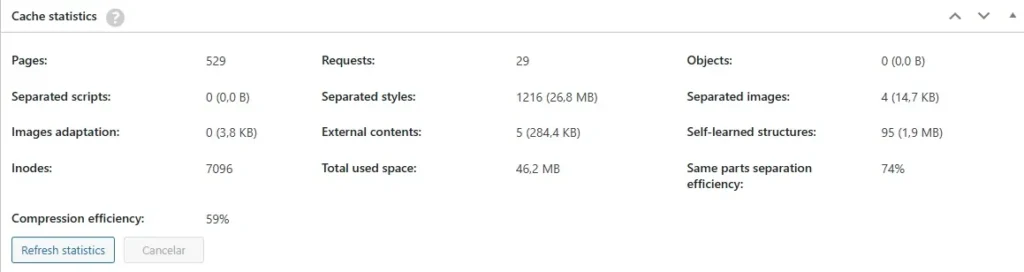
The Cache in WordPress It is the mechanism that stores a static version of your dynamic pages. When active, the server delivers this pre-generated copy instead of running the heavy PHP processes and querying the database for each visitor.
There are several levels of cache:
- Page cache: The most important. plugins like WP Rocket, , W3 Total Cache or LiteSpeed Cache (If your hosting uses LiteSpeed servers) they manage it.
- Object cache: Speed up database queries. Use technologies like Redis or memcached, often offered in advanced hosting plans.
- Browser cache: Instructs the visitor’s browser to store static resources locally for a while.
set up a good plugin Cache in WordPress You can reduce charging times to less than 2 seconds immediately.
WordPress database optimization
Over time, the WordPress database accumulates ‘deadweight’: reviews of old posts, comments in spam, entries in the trash can and transitory data (transients). This overhead can make database queries slower.
The Database optimization Clean this waste. You can do it manually with phpMyAdmin (if you have technical knowledge) or safely with plugins like wp-optimize or Advanced Database Cleaner.
key actions: Schedule a regular clean of post reviews (keeping 3-5 post reviews is enough), remove spam and comments in the bin, and clean transients expired.
Remove unnecessary plugins and optimize their use
Each active plugin adds PHP code, and often its own CSS and JavaScript files, which the site should load. The Unnecessary plugins They are not only a security risk, but a ballast for performance.
Plugin audit:
- Disable and delete Absolutely every plugin you don’t use.
- Evaluate the need of each active plugin. Is its functionality critical? Is there a lighter alternative or can it be achieved with custom code?
- Check the quality: Obsolete plugins (not updated in the last 12 months) or with bad reviews are usually poorly coded.
Remember: Quality over quantity. It is better to have 10 excellent and necessary plugins than 30 mediocre ones.
Using a lightweight and well-optimized theme
A Fast WordPress Theme It is built with clean, efficient code and follows the best development practices. Avoid overly complex ‘multipurpose’ themes at all costs, loaded with options, built-in functionalities and heavy scripts that you will never use.
RECOMMENDED TOPICS: Astra, , generatePress and Kadence They are examples of Quick Themes for WordPress. They are lightweight, highly customizable through WordPress customizer or block schemes, and focus on performance. If you use a Page Builder, choose themes specifically designed for it (such as Astra for elementor).
GZIP compression activation on your server
The gzip compression It’s a server technique that compresses your website’s files (HTML, CSS, JS) before sending them to the visitor’s browser, which then decompresses them. This can reduce the transfer size by more than one 70%.

How to activate it: In many cases, it is automatically activated in optimized hosting. You can check it in tools like Gtmetrix (On the ‘Waterfall’ tab). If it is not active, you can enable it usually by adding rules in the file .htaccess from your site (for Apache servers) or through your hosting/cpanel panel.
Reduce the use of external scripts and unnecessary resources
The external scripts They are resources loaded from other domains: Google Fonts fonts, Facebook pixels, Analytics tracking codes, YouTube embedded videos, etc. Each is an additional HTTP request that can block page rendering and depends on the availability of a third party server.
Optimization strategies:
- Load fonts locally: Instead of using the Google Fonts API, download the fonts and upload them to your server using a plugin like OMGF | host google fonts locally.
- Load scripts asynchronously or deferred: For analytics or advertising codes, use the attributes
asyncorDEFERto prevent them from blocking the load of the rest of the page. Cache plugins like WP Rocket offer this feature. - evaluate the need: Do you really need that heavy social media widget? Sometimes a simple link is enough.
Verification of load speed with analysis tools
Optimizing without measuring is like driving blindfolded. These tools are essential:
- Google PageSpeed Insights: Gives you a score for mobile and desktop and measures the Core Web Vitals (LCP, CLS, INP), Key metrics for the Google ranking. Try it here.
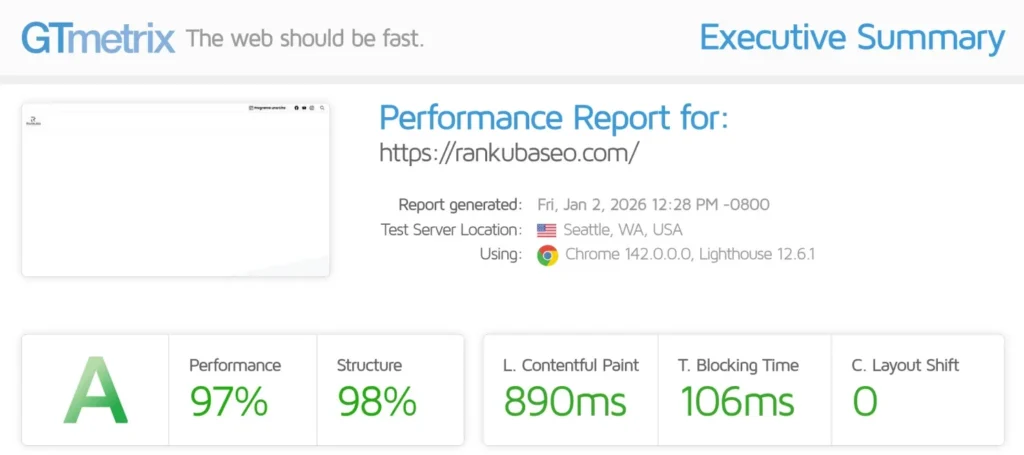
- Gtmetrix: Offers a more technical and detailed analysis, showing the Waterfall (Waterfall) of all the resources, to identify exactly which file is slowing down your site. Try it here.
- WebPageTest: Allows advanced testing from different locations and with specific connections (3G, 4G). Ideal for deep audits.
crucial metric to watch: LCP (largest contentful paint). must be less than 2.5 seconds. This is the time it takes for the largest visible element to load on the screen (usually an image or a title).
Continuous maintenance to maintain optimal speed
How to improve the loading speed of my WordPress web It is not a one-time project, but a continuous habit. The web evolves: you add content, install new plugins, update the theme.
Establish a quarterly routine for:
- Re-run tests in PageSpeed Insights and Gtmetrix.
- Review and clean plugins and themes.
- Optimize new images that you have uploaded.
- clean the database.
The Reward is a site that offers an exceptional experience to your users, improves your conversions and is rewarded by Google with a better position in search results.
Frequently Asked Questions (FAQ)
How can I measure the speed of my WordPress web?
Use the free tools Google PageSpeed Insights and Gtmetrix. Enter your site URL and you will get detailed reports with scores, key metrics (like Core Web Vitals), and specific recommendations to improve. It is the essential starting point for any optimization.
How long should it take my WordPress site to load?
The ideal goal is for the page to be Fully interactive in less than 3 seconds. However, the most important metric for Google and the user experience is the LCP (largest contentful paint), which must be less than 2.5 seconds. On desktop with good connection, try to make it less than 2 seconds.
Can I optimize my loading speed without changing hosting?
Yes, you can achieve significant improvements by implementing a Strong cache plugin, , Optimizing all images and Deleting unnecessary plugins. However, if the root problem is a Slow or saturated hosting (high TTFB), these optimizations will have a roof. Hosting is the foundation.
Is a cache plugin enough to make my website fast?
No, but it is the most important step after having a good hosting. A cache plugin solves much of WordPress’s inefficiency by generating static pages. However, it must be complemented by Image optimization and one Responsible management of plugins and themes for the best results.
Does charging speed really affect SEO?
Absolutely yes. Google has confirmed on multiple occasions that the speed of the page is a Direct positioning factor, both for desktop and mobile searches. In addition, since 2021, the metrics of Core Web Vitals (LCP, CLS, INP) They are part of the ranking algorithm. A slow web also suffers a higher rate of rebound, which indirectly harms SEO.